GHL Tools / Released October 2026
Appointment Colors
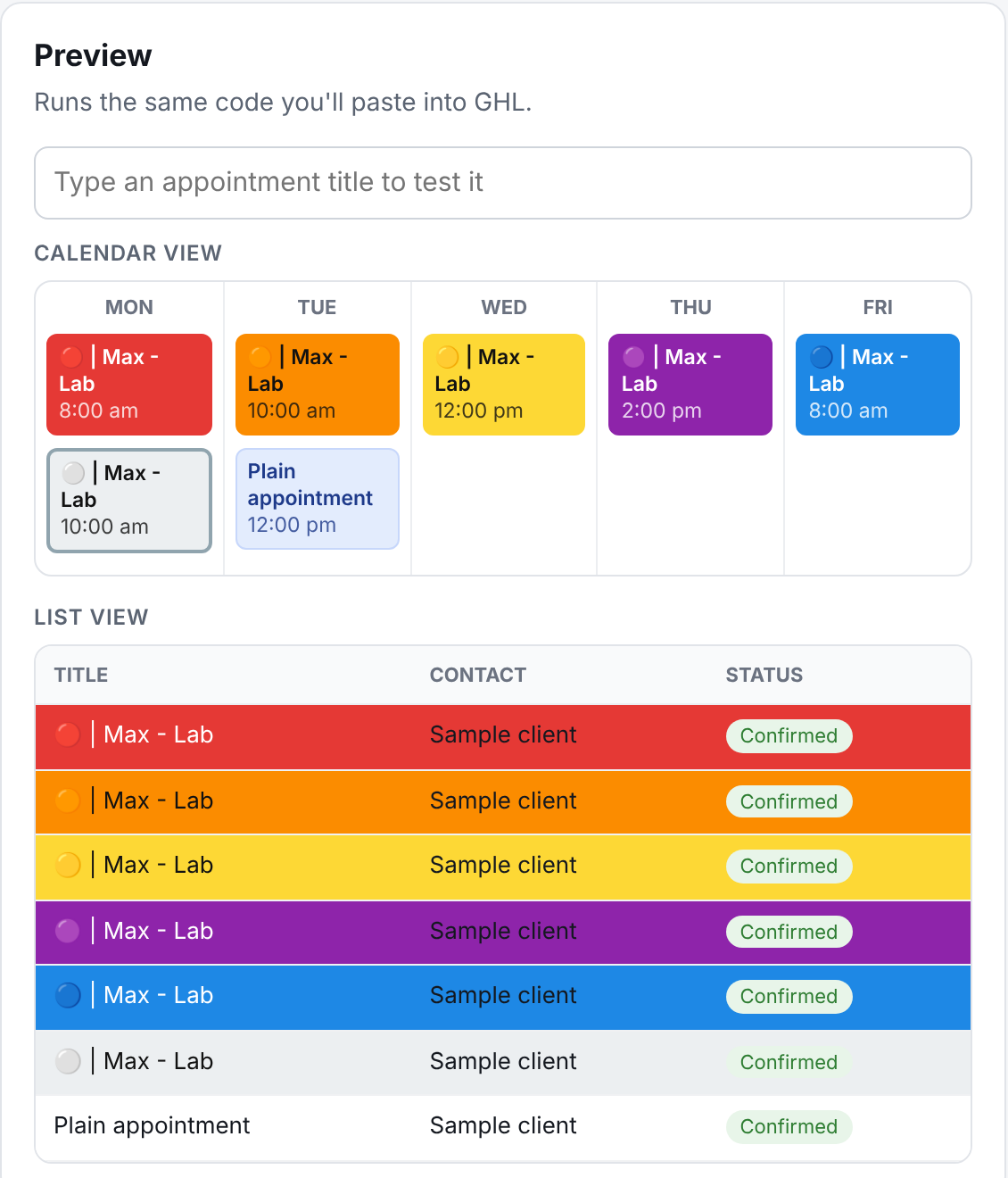
Start an appointment title with a marker like a red circle emoji or a word such as "Consult" and the whole appointment block turns that color in Day, Week, Month and List view. Staff see the important appointments at a glance.
- —Up to 20 color rules: emoji, starts with, contains, or a pattern
- —Fill the whole appointment or add a color stripe
- —Calendar and List view, every user on the sub-account
- —Edit colors in your dashboard; GHL picks them up on the next load
- —Display only: never edits appointments, never reads contact data
[PRICING]
Pick how you pay
Monthly
$19/mo
Appointment Colors on up to 10 sub-accounts. Cancel any time.
Annual
$190/yr
Same tool, paid yearly: save $38 a year.
All-Access
$200/mo
This tool plus every tool we release this month and the whole archive, on unlimited sub-accounts.
Prices in USD. Payments by Stripe. Already a customer? Sign in first so the new plan joins your existing account.
[BUILD IT YOURSELF]
Free prompt, your own build
Register free and paste our prompt into any AI. It builds Appointment Colors for your own GoHighLevel account. Estimated effort: 2 to 4 hours for a non-expert using an AI, including testing in your own GHL and fixing selectors after the first run.
Register free to get itWhat the free build leaves out, compared with the hosted version
- ·No settings editor: you change colors and rules by editing a config block in the code and re-pasting it into GHL
- ·No live preview or test box for checking which rule an appointment title will hit
- ·No on/off switch: to turn it off you delete or comment out the code and save
- ·No seat management or sub-account list: the sub-accounts it runs on are IDs you type into the config
The full list is in the prompt itself. The paid plan above is the same tool, hosted and kept current by us.
[HOW IT WORKS]
Live in 10 minutes
- 1. Buy. Stripe checkout drops you straight into your dashboard with your account key.
- 2. Paste once. Copy one code block into GHL Custom JS, send it to your agency with the ready-made note, or use Tampermonkey.
- 3. Set your colors. The dashboard editor previews exactly what GHL will show. Save and GHL picks it up on the next load.
- 4. Mark appointments. Start a title with your marker, like a red circle emoji, and the appointment turns that color for everyone on the sub-account.
[FAQ]
Do I need to be the GHL agency owner?
No. Agency admins paste the code into Custom JS. If an agency runs your GHL, your dashboard gives you a ready-made note to send them, or you can run it just on your own computer with the free Tampermonkey extension.
Does it change my appointments or read contact data?
No. It only changes how the calendar looks. It reads the appointment titles already on your screen and sends nothing about them anywhere.
How many sub-accounts?
Single-tool plans cover up to 10 sub-accounts. All-Access covers unlimited sub-accounts. Sub-accounts register themselves the first time GHL loads the tool.
What if I cancel?
Cancel any time from Billing in your dashboard. The tool keeps working until the end of the period you've paid for, then switches itself off.
Is there support?
It's self-serve: the dashboard shows whether each sub-account has loaded the tool and why if not, and the install guide covers every setup we've seen.